回复 garytan
Innacomm W3400V 要怎样Set
现在用着Belkin,不过有问题,所以想换
SillyShiun 发表于 2012-7-3 02:58 PM 
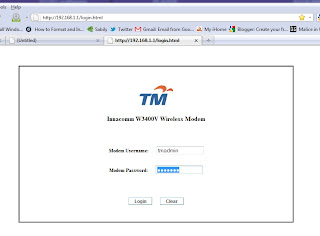
1) Go to 192.168.1.1
With condition of your LAN cable must be plug at the laptop with modem on.
It is okay if the modem did not connect to phone line.
LOGIN in to MODEM ACCOUNT
Modem Username : tmadmin
Modem Password : tmadmin
Above picture is the interface after login.
2) Go to quick setup , select
Protocol : PPoE
Connection mode : LLC
Streamyx ID : username@streamyx (look at a streamyx form )
Streamyx Password :****** (Default password: TMM100)
REMINDER !!** If the Password of Streamyx is wrong , you will be connected , but there will be no internet access.On the signal will appear yellow(!).
3) Click NEXT after done all of the above.
4) In the SSID box , choose any name for ur connection name.
5) Enter the new password for wifi in the network key WEP , it must be 13 ASCII characters .create any and write it in the box.
(example:1234567abcdef)
6) After complete all of the box , click next , and it will appear the description.
7) Press save and logout .
8) DONE.


