狂天使
2011-6-2 11:30 AM
本帖最后由 狂天使 于 2011-6-2 11:36 AM 编辑
最近本人在學C#, 也希望這份文章能幫到想學C#的朋友。
也希望各位大大給些指教哦!
Lesson 1 : Create a windows form and First Program
Go to http://www.microsoft.com/express/Downloads/ download the visual C# 2010 Express
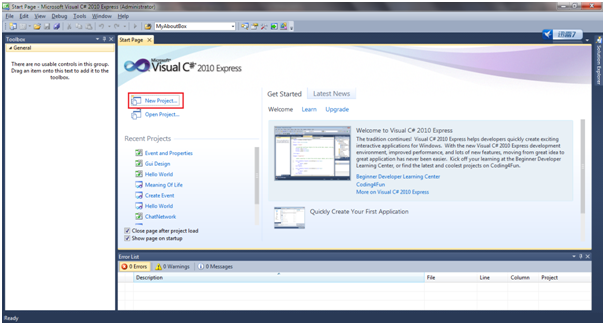
1) Click the new project
2) Choose Windows Form Application and Click Ok at the bottom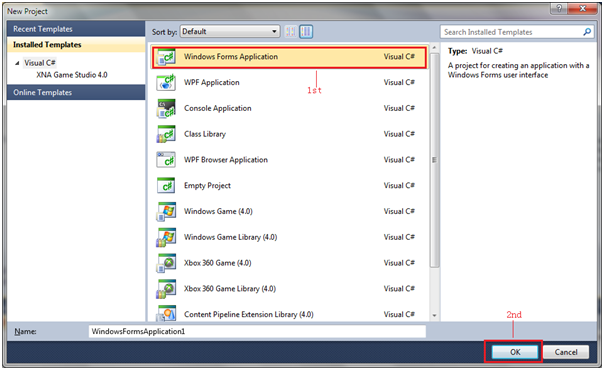
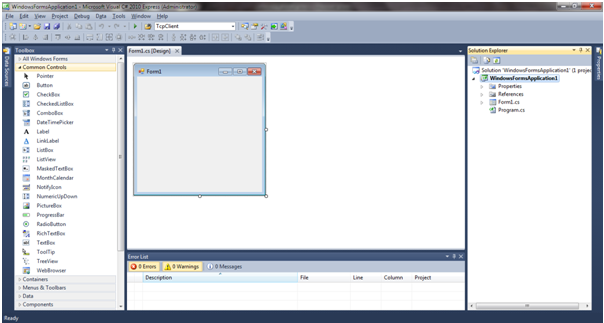
3) Introduce some basic tools
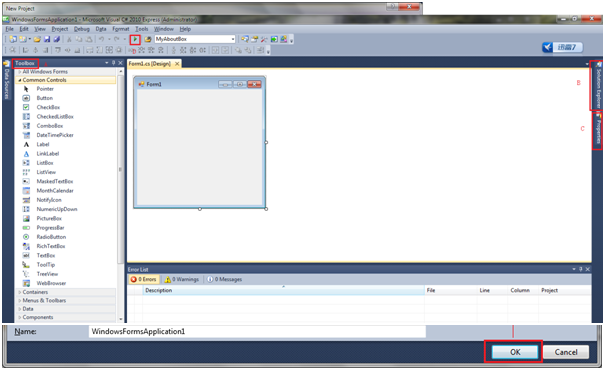
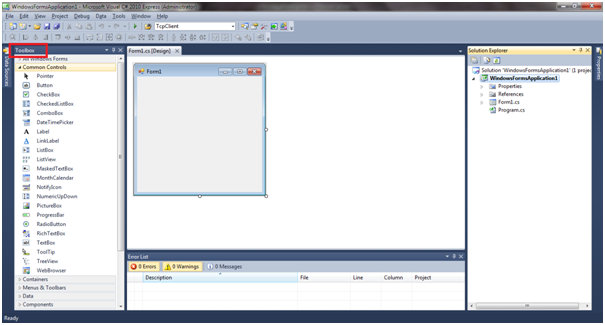
A) Toolbox: Use to design the Windows Form (Ctrl+W+X)
B) Solution Explorer: Can see the Project u create (Ctrl+W+S)
C) Properties: Windows form properties (Ex: change font size, Name, size, etc) (Ctrl+W+P)
D) Start Debugging: Use to debug the project you create. (F5)
4) Now start our first program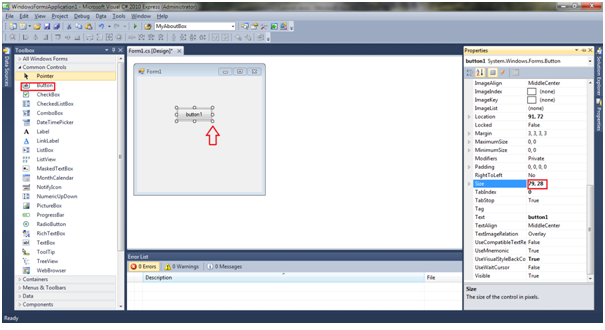
A) Go to the toolbox -> Common Controls -> Button drag to the form. You can use your mouse
resize the button directly or go to Properties->Size to resize your button. The 1st value is width
2nd value is height.
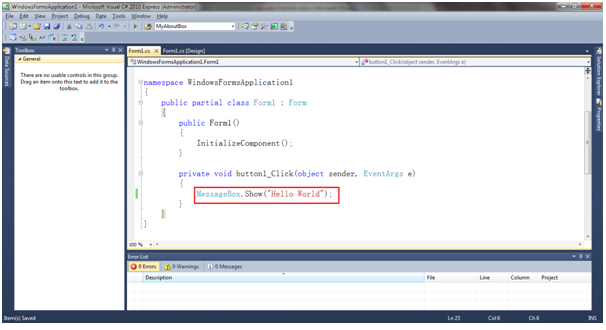
B) Double Click the button1 on Windows Form. Type this [MessageBox.Show(“Hello World”);] in the
button_Click. If you want to know more detail of [MessageBox.Show] can surf this link
http://msdn.microsoft.com/library/default.aspx . [MessageBox.Show] Display a message
box .(Simple Explain)
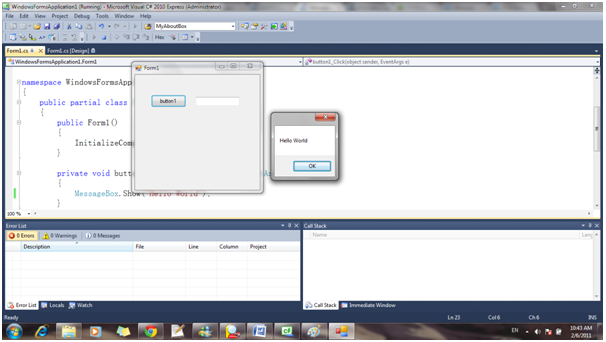
C) Click the Start Debugging(F5), and click the button1 it will appear the MessageBox Hello World. The result will same to above picture.
5) The Project will Store in Document-> Visual Studio 2010 -> Project. You can change your location also, go to File->Save All or CTRL+SHIFT+S.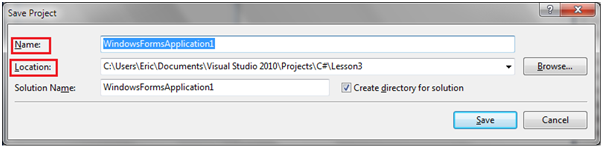
Name: The Project Name
Location: The location that you store the project.
6) So how to let the project be .exe file (.exe file can directly run the program on the Windows).
1) After saving the project you can go to the Menu Bar Debug->Build Solution (F6) then will
generate the .exe file.
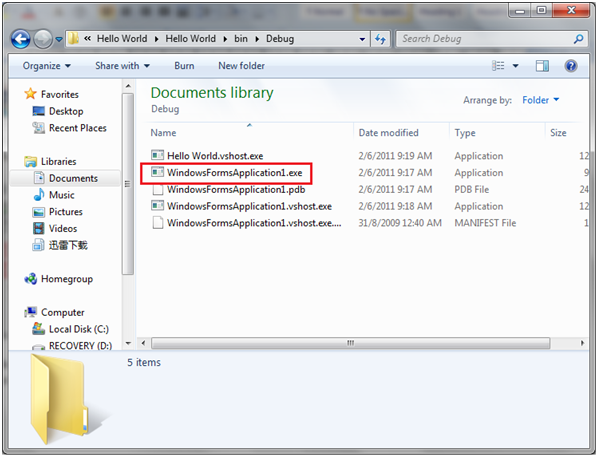
2) The .exe file will store in the “Your Project folder”->bin->Debug after generate. Double Click
the .exe file, it will directly run the program.
END
英文也不是很好,如果Grammar 有錯的話也可以指針我。謝謝各位!
最近本人在學C#, 也希望這份文章能幫到想學C#的朋友。
也希望各位大大給些指教哦!
Lesson 1 : Create a windows form and First Program
Go to http://www.microsoft.com/express/Downloads/ download the visual C# 2010 Express
1) Click the new project
2) Choose Windows Form Application and Click Ok at the bottom
3) Introduce some basic tools
A) Toolbox: Use to design the Windows Form (Ctrl+W+X)
B) Solution Explorer: Can see the Project u create (Ctrl+W+S)
C) Properties: Windows form properties (Ex: change font size, Name, size, etc) (Ctrl+W+P)
D) Start Debugging: Use to debug the project you create. (F5)
4) Now start our first program
A) Go to the toolbox -> Common Controls -> Button drag to the form. You can use your mouse
resize the button directly or go to Properties->Size to resize your button. The 1st value is width
2nd value is height.
B) Double Click the button1 on Windows Form. Type this [MessageBox.Show(“Hello World”);] in the
button_Click. If you want to know more detail of [MessageBox.Show] can surf this link
http://msdn.microsoft.com/library/default.aspx . [MessageBox.Show] Display a message
box .(Simple Explain)
C) Click the Start Debugging(F5), and click the button1 it will appear the MessageBox Hello World. The result will same to above picture.
5) The Project will Store in Document-> Visual Studio 2010 -> Project. You can change your location also, go to File->Save All or CTRL+SHIFT+S.
Name: The Project Name
Location: The location that you store the project.
6) So how to let the project be .exe file (.exe file can directly run the program on the Windows).
1) After saving the project you can go to the Menu Bar Debug->Build Solution (F6) then will
generate the .exe file.
2) The .exe file will store in the “Your Project folder”->bin->Debug after generate. Double Click
the .exe file, it will directly run the program.
END
英文也不是很好,如果Grammar 有錯的話也可以指針我。謝謝各位!